
TeraCryption
Enterprise File Encryption System

STANDARD PLANS AND ENTERPRISE CONFIGURATIONS
SELECT A PLAN FOR YOUR TERACRYPTION SECURE SYSTEM BASED ON YOUR FILE PROTECTION NEEDS.
Over the years of selling TeraCryption, we have learned that each company has its own security policies. Some prefer to encrypt and store files on OneDrive, Google Drive, or Amazon, while others choose to encrypt and keep files on their own servers. Companies that encrypt files, whether big or small, need a way to share these encrypted files. The TeraCryption Plans focus on encryption, file sharing, management, and logging to track each operation for compliance purposes.
We have prepared these four Service Plans to help you choose the most appropriate one for your goals. Contact us for a quotation and a demo.
PLAN 1
TERAKEY
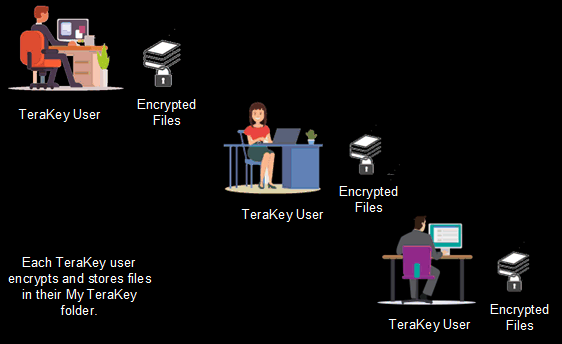
Users install TeraKey on their computers and store encrypted files in their My TeraKey folder. They exchange encrypted files via email, from folder to folder between computers on the network, or by using TeraMail.
-
Each user installs TeraKey on their computer and activates it with their credentials.
-
Users encrypt files on their computer and store them in their My TeraKey folder.
-
Encrypted files can be stored anywhere.
-
The administrator creates Groups and assigns users to control who is authorized to decrypt files encrypted to each Group.
-
Users can send encrypted files to other TeraKey users in their Group via email, the network or TeraMail.
-
No one can access encrypted files without TeraKey and specific permissions.
-
Files are protected with file-level encryption using unique one-time cryptographic material for each file.
-
Automatic Key Management™ – users do not need to create, store, exchange or manually manage file-encryption keys.
-
My TeraKey folder facilitates encryption and storage of files. It is equivalent to “My Documents,” except that all the files are encrypted.
-
TeraKey is the encryption engine; files are never uploaded to any service for encryption, ensuring they remain under your custody at all times.
PLAN 2
TERAKEY FOR SECURE CLOUD STORAGE AND SHARING CONTROL OF FILES.
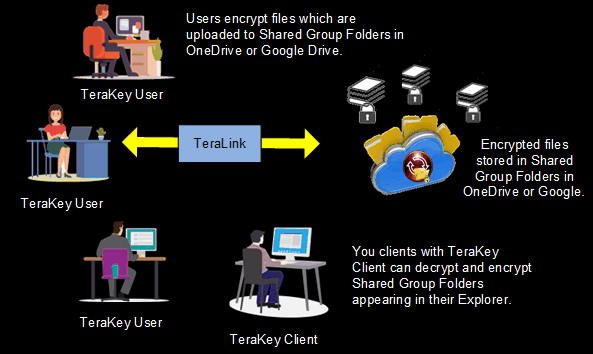
TeraLink connects each user's TeraKey to automatically store encrypted files in the corresponding Group folders in an independent, dedicated OneDrive, Google Drive or Amazon S3 cloud storage account.
Plan 2 has the same features as Plan 1, with the following additional operational features:
-
The administrator creates a new Google Drive, MS OneDrive or Amazon S3 cloud storage account and uses TeraLink to connect to the cloud service.
-
TeraKey users' application will encrypt files and automatically upload them to a Group folder.
-
The TeraCryption security layer only needs one account of the cloud service.
-
Users are not allowed to access the cloud service directly.
-
Users can view in their Explorer the list of encrypted files in each shared Group folder stored on the cloud service.
-
Cloud-stored encrypted files can only be accessed using the TeraKey application after logging in.
-
TeraLink will automatically and simultaneously manage the upload and download of new and edited encrypted files between each user's TeraKey and the cloud service.
-
TeraLink only uploads TeraKey-encrypted files to the configured cloud storage service.
-
TeraLink automatically creates shared Group folders in the cloud for each Group created by the administrator.
-
If a user's computer is affected by ransomware, the TeraKey-encrypted files stored in the cloud service remain available through the TeraCryption system.
-
After the affected computer is restored, TeraKey can be reinstalled and the authorized user can regain access to the encrypted files stored in the cloud.
PLAN 3
TERAKEY FOR SECURE STORAGE ON THE SERVER
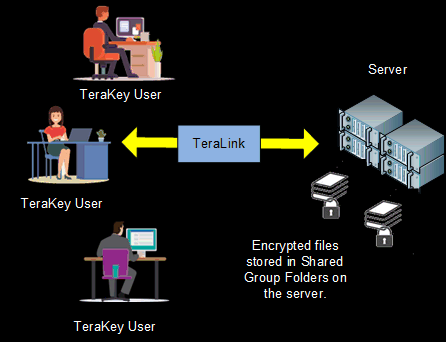
TeraLink connects each user's TeraKey to automatically store encrypted Group files in secure folders on the server. Files are shared without using email.
Plan 3 has the same features as Plan 1 with the following additional operational features:
-
Store TeraKey-encrypted files in a central folder on the server.
-
TeraLink automatically connects each TeraKey user's application to the central folder.
-
Users can view in their Explorer the list of encrypted files in each shared Group folder stored on the server.
-
TeraKey users can securely share encrypted files stored on the server, supporting organizational security and compliance requirements for managing sensitive information.
-
Files can be easily shared via drag-and-drop or 'Save as...' to Group virtual folders showing on their Explorer, accessible only when logged into TeraKey.
-
Note: If you do not use a central server in your business, any computer in a peer-to-peer network can act as the server to store the Group's encrypted shared files. Our support team can do the installation in an online session.
PLAN 4
TERABACKUP TO A CLOUD
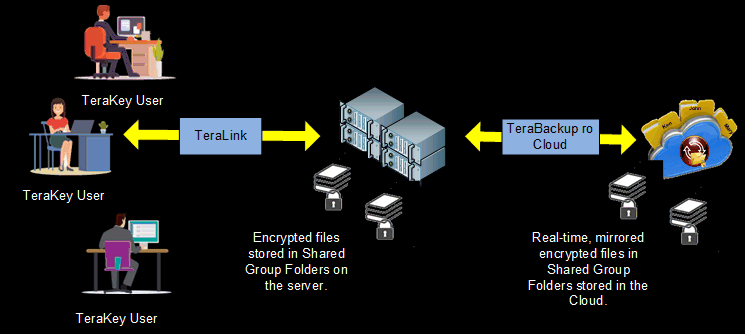
Automatically mirror to a cloud service the encrypted files and folder structure stored in the central server folder in Plan 3 to support recovery operations after a cyberattack.
Plan 4 has the same features as Plan 3 with the following additional operational features:
-
Add TeraBackup when encrypted files are stored in the server's central folder to provide an encrypted cloud mirror for recovery operations after a cyberattack.
-
Install TeraBackup on the server and link it to a configured Google Drive, Microsoft OneDrive, or Amazon S3 account. TeraBackup replicates the folders and encrypted files from the central TeraKey folder and automatically uploads new or updated encrypted files to the cloud mirror.
-
All files in the central TeraKey folder on the server have been encrypted by TeraKey users. TeraBackup maintains an encrypted copy of these files in the configured cloud mirror for backup and recovery.
-
After an attack, the administrator can reinstall the Windows Server environment and TeraBackup, then use the encrypted cloud mirror to restore the folder structure and encrypted files to the TeraKey folder on the server.
-
Users can then reinstall and log into TeraKey to regain authorized access to the restored encrypted shared files.
-
As an option, TeraBackup can automatically back up your Windows SQL database, encrypt it, and store it in the same cloud service as the mirrored central folder, allowing for easy restoration if the company's database is compromised.
-
Note: If you do not use a central server in your business, any computer in a peer-to-peer network can act as the server to store the Group's encrypted shared files. Our support team can do the installation in an online session.
SUBSCRIPTION PRICE
Standard Plans
-
The plans shown above are standard TeraCryption configurations that provide Group-based encrypted file sharing. The administrator creates Groups and controls which users are authorized to belong to each Group. Organizations requiring individual file ownership and more granular control over who within a Group can decrypt specific files can add TeraCryption Enterprise capabilities.
-
TeraMail, which supports encrypted communications between users, is included with each subscription plan.
-
Plan 1 subscriptions start at US$40.00 per user per month, billed annually. A minimum of 5 user licenses is required.
-
TeraLink is included with Plan 2, 3 and 4.
-
TeraBackup is included with Plan 4.
Enterprise Subscriptions
TeraCryption Enterprise adds advanced File Ownership control for organizations that require more granular control over individual sensitive files within authorized Groups.
-
Administration determines which users are authorized to belong to each Group and which users are assigned File Ownership rights.
-
A user with File Ownership rights can control which authorized members of their Group are permitted to decrypt individual files they own.
-
Only the file owner can change the decryption permissions of an owned file. Administration cannot independently change those file permissions.
-
Administration can review file-sharing relationships while allowing file owners to maintain control over who is authorized to decrypt their protected files.
-
If ownership must be transferred because an employee changes responsibilities or leaves the organization, Administration can request the transfer. The ownership change requires approval from a separately designated company executive before TeraCryption performs the transfer.
-
The TeraCryption administrator cannot designate themselves as the executive authorized to approve ownership transfers.
Enterprise configurations can also address requirements involving multiple departments, remote locations, administrative controls, logging, storage environments and other organizational security requirements.
Contact us to discuss your organization's requirements. We can prepare an Enterprise configuration proposal based on the TeraCryption capabilities, deployment requirements and number of users required.
In Summary
Standard Group Control
Administration controls Group membership → authorized Group members share encrypted files
Enterprise File Ownership Control
Administration assigns ownership rights → file owner selects authorized Group members → owner controls file decryption permissions
Subscription Information
-
A 7-day free trial is available upon request.
-
Subscription pricing is subject to change. Contact us to request a quote. Your organization may qualify for a volume discount.
-
The subscription fee includes applicable TeraKey software updates, training videos, and support via online, email and chat channels. Online installation and training are also included.
-
TeraBackup is included with Plan 4.
-
Google Drive, Microsoft OneDrive, or Amazon S3 storage fees are not included in the subscription price.
Book a Demo
Book a demo to see how TeraCryption protects sensitive files with Group-based access control—and how TeraCryption Enterprise adds File Ownership control over which authorized Group members can decrypt individual protected files.